Reviewing phase diagrams
Posted on Sun 30 August 2026 • Tagged with ai, llms, pycalphad
I want to start writing more about how I'm using LLMs to create more leverage in my software development workflows. LLM coding agents are getting really good, but I think they still require a lot of work to not create slop in brownfield projects (see SlopCodeBench).
My opinion is that if it's important to my job or someone else's job that the answer produced by a tool is correct, then a human needs to fully understand the system they are building and working in. I don't think I'm doing anything particularly novel, but I thought it might be nice to show what I'm doing to create more leverage, go faster, and be more ambitious.
I'm currently working on a branch of PyCalphad that will overhaul some of the tie-line in plane mapping capabilities that will go on top of some recent fixes for charged phases as well as for ionic liquids and other convergence improvements. The latter set of changes is expected to be a huge improvement for ionic liquids, which made plotting binary phase diagrams with oxygen particularly troublesome.
As mapping is the primary thing that powers phasediagrams.org, I have a strong corpus of files to test against and some pre-existing runners that churn through and plot phase diagrams for everything. Since this is the first major set of changes like this since the LLMs got good, I wanted to run the whole suite of >2500 databases, and see if I could identify and fix some pathological classes of issues. So what I've done is had the LLM make a few changes to my phase diagram runner code to better instrument it and make some more advanced changes that would have been tedious to do by hand.
Now, I wanted to create the most leverage using my ability to look at phase diagrams and know whether they are right or wrong at a glance, and my knowledge of the code base to have a decent guess about why a diagram is wrong if it is wrong. I started off by using macOS Preview from the Finder window, copying file names and writing notes in a markdown document for wrong diagrams. I realized I could be doing this much faster if I had the LLM create a browser based tool to allow me to quickly mark diagrams as good or bad (with feedback) and go through the list as quickly as possible. Here's a video of me using that tool and working through it:
Every time I mark a diagram as good or bad it updates a CSV file with my feedback and notes. Then once the whole set is finished, I have the coding agent go through and look in detail at all the incorrect features that I flagged, attempt to find the root cause, and then classify all the phase diagrams according to their failure mode. I was using Claude Code and got back a markdown file and an artifact that looked something like this:
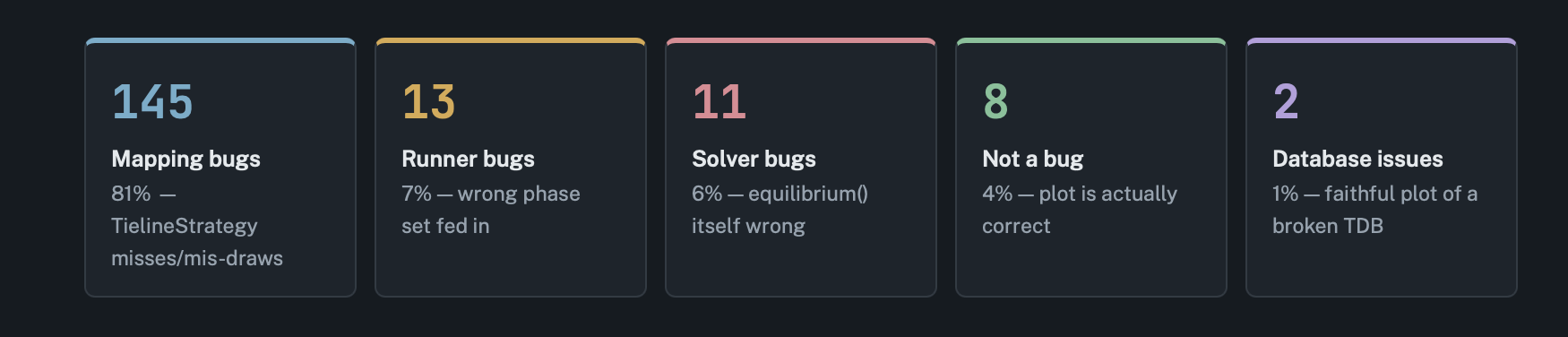
From here, I read through the document and dug deeper on a number of things where the model made incorrect assumptions or came to different conclusions than I would. The tool to build the classification was genuinely useful and I got 2 or 3 actionable bug fixes and another 1 or 2 issues that are out of scope for now or require more thought and design iteration before they're ready to fix. I then draft a new prompt that details the fixes I want to make in a new checkout of the code and in the runner, where all the changes in the code get isolated down to a fast, minimal reproducer and follow TDD. Before making each commit the LLM must run all the affected diagrams for that issue class and verify they are fixed. When it makes the commit, it fires off a new job to run the entire suite of diagrams again.
Once they're done, I can use my tool in regression mode where it will only show me diagrams that are different (by image comparison) or were marked as failed in the previous run. Rinse and repeat. When I'm happy with what I see I go back through and read the code for each commit and clean it up by hand. Sometimes this ends up with just scrapping it altogether because the LLM went a different direction than the one I wanted or made more invasive changes than I'm comfortable with.
This kind of approach saves me a ton of time by being able to use my skills to do a high-quality search through the diagrams. I am able to align the LLM with my understanding of the code base and read all the code to not create slop. The ability for the LLM to iterate and check its own work lets me bite off these huge chunks and solve classes of problems that I would've tackled by debugging them one at a time in a pre-LLM world.